 Billonlinemepco
What is a Duplicate Electricity Bill?
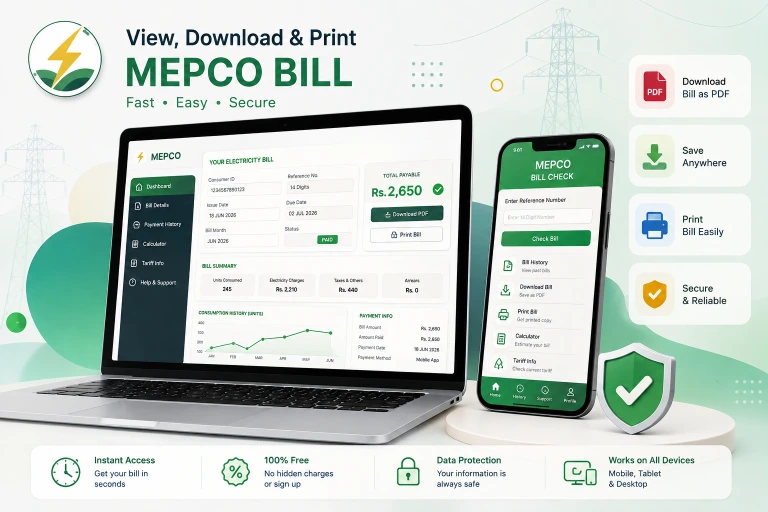
A duplicate bill is a reprint of your current or previous electricity bill generated from the PITC billing portal. It contains all the same information as your original printed bill — reference number, consumer ID, payable amount, due date, meter reading, and complete charge breakdown. If your bill has not been generated yet, you can estimate the charges using our bill calculator.
Banks, utility apps, and payment counters all accept a duplicate bill for payment. You do not need the original paper copy.
How to Download Your Duplicate Bill — Step by Step
Method 1: Through This Site (Fastest)
- Enter your 14-digit reference number in the tool at the top of this page
- Your current bill loads instantly
- Click Download PDF or Print
- Save it to your phone or print directly
Method 2: Through the Official PITC Portal
- Visit bill.pitc.com.pk/mepcobill
- Enter your 14-digit reference number
- Click "Get Bill"
- Use your browser's print function (Ctrl+P or the print icon) to save as PDF
Method 3: Via SMS (No Internet)
Send your 14-digit reference number to 8119 from any mobile network. You receive the current bill amount and due date by return SMS — useful when you only need the amount, not the full printed copy.
Where to Find Your 14-Digit Reference Number
The reference number is the most important number on your electricity bill. It is a 14-digit code printed at the top left corner of every MEPCO bill, usually labeled "Reference No." or "Ref No."
It looks like this: XXXXXXXXXXXXXX (14 digits)
If you cannot find a previous bill:
- Check your landlord — they may have an older copy
- Ask a neighbor in the same building — their reference number structure will be similar and a subdivision office can identify yours
- Visit your nearest subdivision office with your CNIC. They can retrieve your reference number from their system using your address
You can also use your 10-digit consumer ID (labeled "Consumer ID" or "Cons. No." on the bill) instead of the reference number on the PITC portal.
How to Download Old or Previous Bills
The PITC portal stores your last 12 months of billing history. To access previous bills:
- Enter your reference number in the tool above
- After your current bill loads, look for the "Previous Bills" or "Bill History" section
- Select the month you need
- Download or print that bill as a PDF
Bills older than 12 months are not available through the online portal. For older records, contact your nearest subdivision office with your CNIC and reference number. They can retrieve historical billing data from their internal system, though this may take a few days.
You can also view your complete 12-month bill history here.
Can I Pay Using a Duplicate Bill?
Yes, absolutely. A duplicate bill downloaded from the PITC portal is fully valid for payment through:
- JazzCash, EasyPaisa, or any mobile wallet
- Any bank branch (HBL, UBL, MCB, ABL, Meezan, etc.)
- ATMs across Pakistan
- Pakistan Post offices
- Online banking apps
The payment systems use your reference number, not the physical bill itself. So even without any printed copy, you can pay by simply knowing your 14-digit reference number. The printed or downloaded duplicate bill is for your records.
Duplicate Bill Not Found — Common Reasons and Fixes
"Reference number not found"
Double-check the number from a physical bill. Reference numbers are exactly 14 digits — no spaces, no dashes. If you have been typing it with a dash or space in the middle, remove it and try again.
Bill shows last month, not current month
Your bill may not have been generated yet. Electricity bills are typically available 2 to 3 days after the meter reading date. If today's date is within the first few days of the billing cycle, wait and check again.
Portal shows "bill already paid"
This appears when your current bill has been paid and the next bill has not been generated yet. Check back after your next meter reading date.
Bill appears but amount shows zero
Zero-amount bills can happen when your previous bill was overpaid and the credit is carried forward. The bill is still valid — it simply means nothing is due this month.
You see a different name on the bill
If the name on the bill does not match you — particularly in rental properties — you are still responsible for payment if it is your connection. To update the name, visit your subdivision office with CNIC and property documents.
Duplicate Bill for Complaint Purposes
When filing a billing complaint — for wrong readings, overbilling, estimated readings, or name corrections — you will need to submit a copy of your bill as supporting documentation.
A downloaded duplicate bill from the PITC portal is accepted for all complaint purposes. Print it or show it on your phone at the subdivision office.
For step-by-step complaint filing, read the bill complaint guide.
Frequently Asked Questions — Duplicate Bill
Is a duplicate bill valid for bank payment?
Yes. All banks and payment apps use your reference number for processing — the physical paper is not required. A downloaded PDF duplicate is fully accepted.
Can I get a duplicate bill without a reference number?
You need either the 14-digit reference number or the 10-digit consumer ID. If you have neither, visit your nearest subdivision office with your CNIC. They can pull up your account from your address.
How many months of bills can I download?
The PITC portal shows the last 12 months. For older bills, contact the subdivision office directly.
Why does my downloaded bill look different from the paper bill?
The downloaded version from the PITC portal is a simplified digital version. It contains all billing information but may not have the exact same layout as the printed bill delivered by the meter reader. Both are equally valid.
Can I download someone else's bill using their reference number?
The portal is public-access — entering any valid reference number shows that bill. This is how the system works in Pakistan. The reference number is effectively your access key to the billing information.
My bill is in the wrong name — can I still pay it?
Yes. Payment is linked to the reference number, not the name. Pay the bill normally. To update the name, submit a separate name correction request at your subdivision office.
I need a bill for the last 3 years for legal or property purposes — how do I get it?
Online download covers 12 months only. For older records, submit a written request at your circle office (not just the subdivision). Bring your CNIC, reference number, and the purpose of the request in writing. Processing typically takes 2 to 3 weeks.
Last updated: August 2026