 Billonlinemepco
What You Need Before Paying
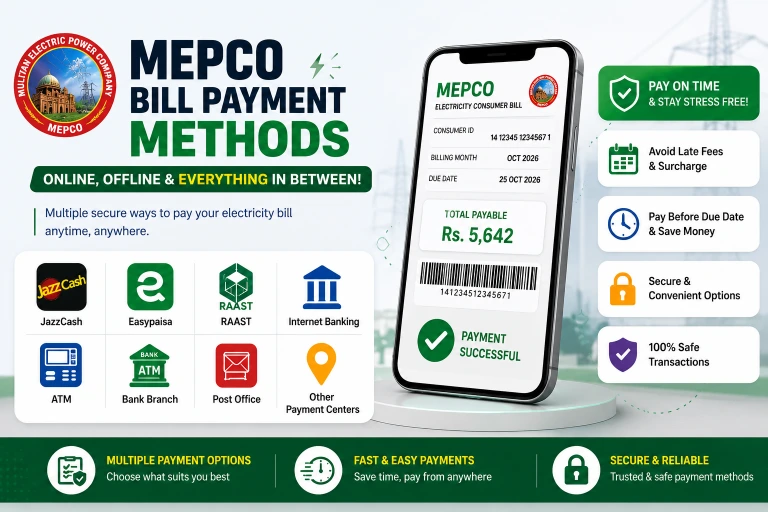
Before you start, have one of these ready:
- 14-digit reference number — printed at the top left of any previous bill. If you lost your bill, you can always download a duplicate bill online to find it.
- 10-digit consumer ID — printed just below the reference number on your bill
- The payable amount.
You do not need the physical paper bill to pay. The reference number is all payment systems require. If you just want to verify the exact amount before proceeding, you can check your current bill amount using the tool on our homepage.
Method 1: JazzCash (Most Popular in South Punjab)
JazzCash is the most widely used mobile payment app in South Punjab. Payments reflect in the PITC system within a few hours, and you can later verify this by checking your payment status and history online.
Steps:
- Open the JazzCash app on your phone
- Tap Bill Payment from the home screen
- Select Electricity
- Select MEPCO from the electricity provider list
- Enter your 14-digit reference number
- Your current bill details and payable amount load automatically
- Confirm the amount and tap Pay
- Enter your JazzCash PIN to authorize
- You receive a payment confirmation SMS immediately
JazzCash without the app (USSD):
Dial *786# → Bill Payment → Electricity → MEPCO → enter reference number → confirm.
Works on any mobile phone, including basic keypad phones, without internet.
Method 2: EasyPaisa
EasyPaisa works the same way as JazzCash. Both are equally reliable for electricity bill payment. If you notice an incorrect amount before paying with either app, you should immediately file a billing complaint rather than paying the wrong amount.
Steps:
- Open EasyPaisa app
- Tap Pay Bills
- Select Electricity Bill
- Select MEPCO as the provider
- Enter your reference number
- Verify the amount shown
- Tap Pay and confirm with your PIN
EasyPaisa without the app:
Dial *786# → Bill Payments (same USSD code as JazzCash — both networks share 786).
Paying via Daraz Wallet (dBills)
Daraz's payment platform includes a utility bill section called dBills, which supports electricity bill payments including MEPCO connections. It's useful if you regularly shop on Daraz and keep a Daraz Wallet balance.
How to pay:
- Open the Daraz app and log into your account
- Find the dBills or Bill Payment section in the main menu
- Select Electricity as the category
- Choose MEPCO from the provider list
- Enter your 14-digit reference number
- Verify the bill amount and due date shown
- Select Daraz Wallet as your payment method
- Confirm payment — you receive a confirmation notification immediately
Daraz occasionally offers cashback promotions on utility payments through dBills — check the promotions section of the app before paying if you want to benefit from any active offers.
Paying at NADRA e-Sahulat Centers
NADRA e-Sahulat centers are agent-operated service points found in small towns and rural areas across South Punjab where digital banking access is limited. They handle cash payments for a range of government and utility services including electricity bills.
How to pay:
- Visit any NADRA e-Sahulat center near you
- Tell the operator you want to pay your electricity bill
- Provide your 14-digit reference number and the payable amount
- Pay in cash
- Receive a printed transaction slip confirming payment
This is a particularly useful channel for consumers in smaller towns and villages across districts like Layyah, Rajanpur, and Muzaffargarh where full-service bank branches or ATMs may not be immediately accessible.
Barcode Scanning for JazzCash and EasyPaisa Payments
A faster alternative to manually entering your 14-digit reference number: both JazzCash and EasyPaisa apps support barcode scanning directly from your printed bill.
How to use it:
- Open JazzCash or EasyPaisa app
- Go to Bill Payment → Electricity → MEPCO
- Instead of typing the reference number, tap the barcode scanner icon
- Hold your phone's camera over the barcode printed on your paper bill
- The app automatically reads and enters your reference number
- Verify the details and pay normally
This eliminates the most common payment error — a typo in the 14-digit reference number — and is faster than manual entry. Any paper bill has a scannable barcode printed on it for exactly this purpose.
Method 3: Bank Mobile Apps
All major Pakistani banks now support electricity bill payment. The process is similar across all of them.
HBL Mobile / HBL Konnect:
Home → Pay Bills → Electricity → select MEPCO → enter reference number → pay
UBL Digital:
Bills & Payments → Electricity → select MEPCO → reference number → confirm
Meezan Bank (MCB):
Bill Payments → Utilities → Electricity → select MEPCO → enter details
MCB, ABL, Bank Alfalah, Habib Metro, Bank of Punjab — all follow the same flow under Bill Payments → Utilities or Electricity.
Payments through bank apps typically reflect in 1 to 2 working hours during banking hours. Payments made on weekends or after 6 PM may take until the next working day to reflect in the PITC system. If your due date is tomorrow, pay today.
Method 4: ATM Payment
Any bank ATM in Pakistan can process electricity bill payments — you do not need to use your own bank's ATM.
Steps:
- Insert your debit card and enter PIN
- Select Bill Payment (or Utility Bill Payment)
- Select Electricity
- Select MEPCO as the provider
- Enter your 14-digit reference number
- Confirm the amount shown
- Confirm payment
- Keep the printed receipt as proof
ATM payment receipts are the most reliable physical proof of payment. Keep them until the next bill confirms your payment was received.
Method 5: Bank Branch
Walk into any branch of HBL, UBL, MCB, ABL, Meezan, Bank of Punjab, or most other scheduled banks in Pakistan. Tell the teller you want to pay an electricity bill.
You need: your reference number and the payable amount. You do not need the physical paper bill — but bringing the duplicate bill PDF on your phone makes the process faster.
The teller processes the payment and gives you a stamped deposit slip. This slip is your legal proof of payment — do not discard it.
Bank branches in major South Punjab cities (Multan, Bahawalpur, Rahim Yar Khan, DG Khan, Sahiwal) have dedicated utility payment counters at larger branches to reduce wait times.
Method 6: Pakistan Post Office
Pakistan Post offices across South Punjab accept electricity bill payments. This option is especially useful in smaller towns and tehsil-level areas where bank branches are limited.
Take your reference number and the payable amount to any post office counter marked "Utility Bills" or "MEPCO Payment." Payment is cash only at post offices. You receive a stamped receipt.
Method 7: Raast — Pay and Win a Lucky Draw
Since 2025, the company has partnered with Raast (Pakistan's interbank instant payment system) to run a lucky draw for consumers who pay their bills through Raast-enabled apps.
Every bill paid via any Raast-integrated banking app automatically enters you into the draw. Multiple prizes are awarded monthly. You do not need to register separately — paying is the entry.
Apps that support Raast payments include HBL, UBL, Meezan, MCB, Bank Alfalah, Sadapay, and Nayapay. Check if your bank app has a Raast payment option under bill payment.
Method 8: Retailer / EasyLoad Agent (Offline Areas)
In areas with limited bank or app access, local mobile phone retailers and EasyLoad agents can process bill payments for a small service fee (typically Rs. 20 to Rs. 50). Give the agent your reference number and cash. They process it through their JazzCash or EasyPaisa merchant account and give you a receipt.
Verify the receipt immediately — it should show your reference number, the amount paid, and a transaction ID.
What is the bill Due Date?
Your due date is printed on the payment stub of your bill. There are two amounts:
- Amount payable by [Due Date] — the base amount if you pay on or before the due date
- Amount payable after [Due Date] — the same amount plus 10% late payment surcharge
The due date is typically 15 to 20 days after the bill issue date. You can check both amounts and the due date by entering your reference number in the bill checker at the top of this page.
Practical advice: Do not wait for the paper bill to arrive. Check online immediately after your meter reading date and pay 2 to 3 days before the due date. This ensures your payment processes before midnight on the due date, avoiding the surcharge.
How to Check If Your Payment Was Received
After paying, check the payment status using your reference number:
- Enter your reference number in the bill checker on the homepage
- The bill will show as "Paid" once payment is registered in the PITC system
- JazzCash and EasyPaisa payments typically reflect within 2 to 6 hours
- Bank app payments take 1 to 4 hours during working hours
- Bank branch payments can take until the next working day
If the status still shows "Unpaid" 24 hours after payment, check your transaction receipt for the confirmation number and contact your subdivision office or the payment channel's customer service.
What Happens If You Miss the Due Date?
Missing the due date has two consequences:
Immediate: A 10% late payment surcharge is added to your next bill automatically.
Extended non-payment: After 60 to 90 days of unpaid dues, a demand notice is issued. If payment is still not made, disconnection follows. After disconnection, you must pay the full outstanding amount plus a reconnection fee (Rs. 500 for single-phase, Rs. 1,000 for three-phase) to restore service.
If you cannot pay the full amount by the due date, contact your subdivision office and apply for a payment arrangement before the deadline. Do not wait for disconnection — options available before disconnection are significantly better than after.
Frequently Asked Questions — Bill Payment
Which is the easiest way to pay my electricity bill online?
JazzCash and EasyPaisa are the fastest and most accessible — both work on basic USSD without a smartphone. For app users, any bank mobile app works equally well.
Can I pay without knowing the exact bill amount?
Yes. When you enter your reference number in any payment app, the current payable amount loads automatically from the PITC system. You do not need to know the amount in advance.
I paid through JazzCash but my bill still shows unpaid — what do I do?
Wait at least 6 hours. If it still shows unpaid after 24 hours, take a screenshot of your JazzCash payment confirmation (which shows the transaction ID and reference number) to your subdivision office. Occasional sync delays between payment processors and PITC can occur — your receipt is proof.
Can I pay a partial amount?
Partial payment is technically possible at bank branches, but the system expects full payment. If you pay less than the billed amount, the shortfall carries forward as arrears with the 10% LPS applied (to understand all these charges, read our bill explained guide). It is always better to pay in full. If you genuinely cannot, contact your subdivision office about an installment arrangement.
Is there any transaction fee for paying online?
JazzCash and EasyPaisa generally charge no transaction fee for utility bill payments — they earn commission from the company, not the consumer. Bank mobile apps are also typically free. ATMs and bank branch counters are free. Retailer agents may charge Rs. 20 to Rs. 50.
Can I pay from another city?
Yes. The payment is linked to the reference number, not your physical location. You can pay a Multan connection's bill from Karachi, Lahore, or anywhere with any payment channel.
What is the latest time I can pay before the due date?
For digital payments (JazzCash, EasyPaisa, bank apps), pay at least 2 to 3 hours before midnight on the due date. For bank branches, pay before closing time. ATMs are available 24/7 but payment processing may not reflect until the next morning if done very late at night.
Last updated: August 2026